
Skate 3 recomp on Steam Deck: native Linux build vs Proton, install steps, the settings worth changing, and controller facts, as of v2.0.2.
Skate 3 Recomp Steam Deck: A Handheld Setup Guide
Yes, Skate 3 recomp runs on Steam Deck, and it does not even need Proton: the project ships a native Linux build alongside Windows and macOS, so the Xbox 360 game plays on the Deck as native code through Vulkan. The practical choice on Deck is native Linux build versus Windows build under Proton — the project's own README notes that on some hardware the Proton route feels better. This page covers both, plus the settings and controller facts that matter on a handheld, as of skate3recomp v2.0.2 (July 24, 2026).
Context in one line: this is the native PC port of 2010's Skate 3 (separate from ReSkate, the mod platform for EA's new skate. — the naming is sorted out in the recomp vs ReSkate guide). The rule every page in this family repeats: the project ships no game files, so bring your own Xbox 360 disc image before starting.
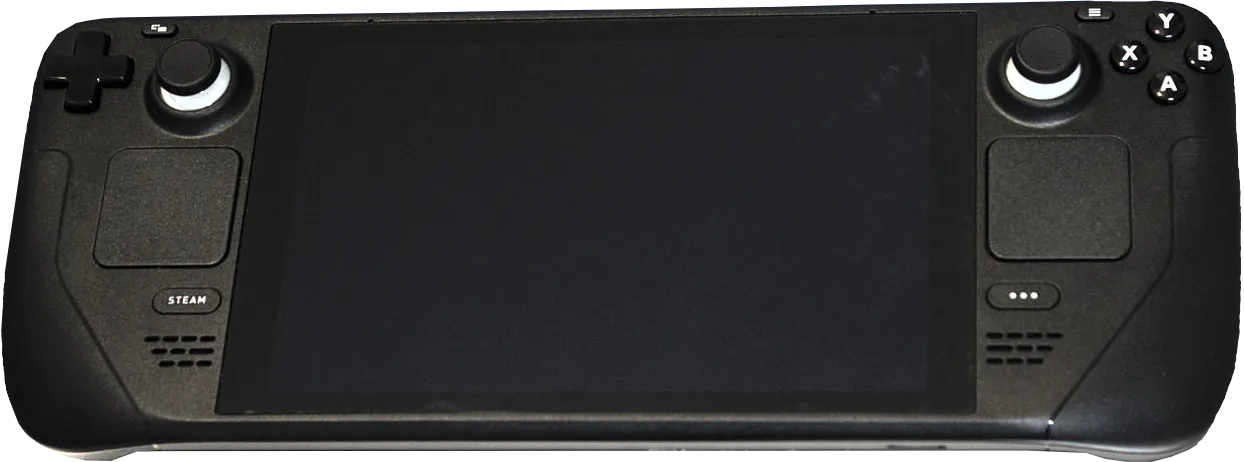
Image: Liam Dawe/GamingOnLinux (PNG version by VulcanSphere), Wikimedia Commons, CC BY-SA 4.0. The Steam Deck hardware itself.
Official source: skate3recomp on GitHub — per-platform downloads, the Proton note, and the controller backend behavior below all come from the project README (checked 2026-10-11).
Which Build to Install on Deck
The README's own testing hierarchy is blunt: the Windows version is the most tested, followed by Linux, and then macOS. The same page adds the nuance that decides the Deck question: on some hardware configurations, you may have a better experience running the Windows version through a translation layer like Proton than the native Linux build itself.
| Route | What it is | Why pick it |
|---|---|---|
| Native Linux build | Skate3Recomp-Linux.zip, runs Vulkan directly |
No Proton layer; simplest long-term; Vulkan-only by design |
| Windows build under Proton | Skate3Recomp-Windows.zip added to Steam as a non-Steam game with Proton forced |
The most-tested binary; sometimes smoother in practice per the README |
Both routes need the same input: run the program, click Select ISO, point it at your own legally obtained Xbox 360 Skate 3 disc image, wait for the extraction, and press Start Game. If you plan to use the community Level Loader for maps, also have Title Update 3 from your own copy at hand — it asks for it on first run.
Step by Step: Native Build on SteamOS
- Switch to Desktop Mode and open a browser.
- Download the latest
Skate3Recomp-Linux.zipfrom the official Releases page — v2.0.2 at the time of writing. - Extract it somewhere you control (a home-folder game directory; avoid system paths).
- Run the
skate3binary, click Select ISO, and pick your disc image. - Wait for extraction, press Start Game — and optionally add the binary to Steam as a non-Steam game so it joins your library with a proper tile.
For the Proton route, the same steps apply with the Windows zip, plus: add skate3.exe to Steam, open Properties → Compatibility, and force a recent Proton. The Steam Deck and Linux guide for ReSkate covers Proton-version hygiene in detail if you are running both platforms on one Deck.
The installer wants a local disc image file. Copy your ISO to the Deck (external drive, network share, whatever you already use) before you start — that is the only download step the project itself cannot do for you, because it ships no game data.
Settings Worth Changing on a Handheld
The v2.0 native renderer's enhancement list is exactly the same on Deck as on desktop — Settings > Video carries MSAA up to 8x, enhanced contact-hardening sun shadows, ambient occlusion, bloom, volumetric lighting, extended draw distance and world streaming, render scale up to 3x, and true ultrawide (ultrawide is pointless on the Deck's 16:10 panel, but the rest apply). The skatemods install guide's advice for where to spend the budget transfers directly: start with render scale and MSAA, and raise the rest if you have headroom.
Two Deck-specific notes on the renderer:
- The Linux build uses Vulkan only (Windows ships both backends, macOS runs Vulkan through MoltenVK), so there is no graphics-API toggle to fiddle with on Deck — one backend, less to configure.
- F5 hot-toggles between the native and emulated renderers on any platform. If the native path ever hits an unrecoverable error, the game falls back on its own and shows a corner indicator; F5 retries the native route. On a handheld this makes the fallback harmless rather than a crash.
Known rough edges travel with the build: texture pop-in while streaming, skater-customization rendering quirks, Hall of Meat visuals missing bone highlights, and some park-editor visual differences. None are Deck-specific; all are on the project's issue tracker.
Controls on Deck: The Good News
The recomp is a controller-first project, which makes the Deck its natural home. The facts from the README:
- Standard Xbox controls are the preferred and main input — the Deck's own pad presents as a standard gamepad, and the mapping matches the Xbox 360 original.
- PlayStation, Switch, and generic controllers go through the SDL backend (Settings > Controls > Controller Backend, then restart). On Linux and macOS the SDL backend is always used, so those controllers work out of the box.
- Steam Input through XInput also works — so Deck-native layouts and per-game input profiles behave as expected.
- Keyboard controls can be enabled in the game settings menu for docked play; the README publishes the full keybind table (WASD for the left stick, mouse for the right, Space/C/E/F for face buttons, and so on).
- Escape on keyboard, or RB + Start on the pad, opens the game settings menu — the chord is rebindable in Settings > Controls.
No key remapping gymnastics are needed on Deck. The one control-adjacent habit worth adopting: if a tutorial video shows a settings chord that does nothing, your build's chord may differ — check Settings > Controls rather than trusting the video's age.
Performance Expectations: The Honest Version
There is no official Steam Deck benchmark for the recomp, and this page will not invent one. What can be said with sources: the v2.0 native renderer replaced GPU emulation entirely, and the project's own figures claim more than double the frame rate at roughly a quarter of the GPU power draw versus the emulated renderer — with the biggest uplift on Apple Silicon, which says more about that platform than the Deck but demonstrates how much overhead the native renderer removes. A game that a 2010 console ran at 30 FPS, drawn by a modern GPU natively at adjustable render scale, leaves generous headroom on Deck-class hardware; where exactly your build lands depends on the settings you pick above.
A recurring Deck mix-up: EA's new skate. does not run on Steam Deck at all, because its anti-cheat has no support there — that is why ReSkate's offline pinned build exists for the new game (the Deck guide for ReSkate). The recomp has no anti-cheat and no EA servers in the picture, which is precisely why it runs natively. Different games, different constraints — do not expect one page's steps to fix the other platform.
FAQ
Does Skate 3 recomp need Proton on Steam Deck? No — a native Linux build ships in every release and runs Vulkan directly. Proton with the Windows build is the alternative, and the README itself says some hardware feels better on it, so both are legitimate first tries.
Where do I get the Linux build?
The official Releases page of the mchughalex repository, as Skate3Recomp-Linux.zip. Extract, run skate3, Select ISO, Start Game. Never download the build from a mirror.
Does it run well on Deck? The project publishes no Deck benchmark, so numbers you see are anecdotal. What is documented: the native renderer more than doubles frame rate at a quarter of the GPU power versus the emulated renderer (author figures), and a 2010 console game drawn natively leaves real headroom. Start at render scale plus MSAA and climb.
Do DLC and saves work on Deck?
Yes, same as desktop: a dlc folder beside the executable loads your own Xbox 360 DLC packages, and saves live in the user data folder — or in a saves folder next to the executable if you create one before first launch (existing saves are not migrated automatically; copy them over).
Can I use the Deck's trackpad and back buttons? The recomp sees the Deck as a standard gamepad through SDL on Linux, so pad inputs map as the Xbox layout; Steam Input through XInput works too if you want custom layouts for back-button grip binds. Trackpad-as-mouse matters for the installer — the Select ISO dialog is a normal desktop window, easiest in Desktop Mode.
Related
More ReSkate Guides
Skate 3 on mobile explained: the community recomp builds that actually run on Android and iOS, what they need, and the APK-download warning.
Install Skate 3 DLC on RPCS3: what the add-on packs contain, where the files go, how to confirm a pack loaded, and the corrupt or missing DLC fixes.
The Skate 3 RPCS3 settings that matter: the documented baseline, patch toggles, slow motion and controller fixes, and a Steam Deck starting point.
Skate 3 save editors explained: what these community tools change, which platforms they cover, and the corruption risks to weigh before you edit a save.
Skate 3 save files across PS3, Xbox 360, RPCS3 and the PC port: where each one is stored, how to copy a save, and what a 100 percent save file does.
Skate 4 vs Skate 3 for PC players: what carried over, what the new game left out, and the mods that bring Skate 3 maps, realism and Hall of Meat back.
ReSkate Steam Deck settings that matter: launcher tuning, the Steam launch option, Proton hygiene, map weight choices, and the real FPS reports, as of v2.0.2.
skate. updated on Steam and ReSkate stopped working? Here is why the build pin matters, what to check first, and the safe order to fix it without losing mods.