
ReSkate Steam Deck settings that matter: launcher tuning, the Steam launch option, Proton hygiene, map weight choices, and the real FPS reports, as of v2.0.2.
ReSkate Steam Deck Settings: A Tuning Guide
There is no settings menu inside ReSkate labeled "performance" — on Steam Deck, the tuning lives in four places: the launcher's Settings page, the Steam launch option that starts ReSkate from skate.'s own entry, the choices you make about which maps to run, and Proton hygiene. This page walks each one, with the only FPS numbers that have an actual source attached, as of ReSkate v2.0.2 (October 9, 2026).
This is the tuning page; the setup page is its sibling. If the launcher is not installed on the Deck yet — Desktop Mode, extract beside Skate.exe, add to Steam with Proton forced — the Steam Deck and Linux guide covers that start to finish. Come back here once the game boots.
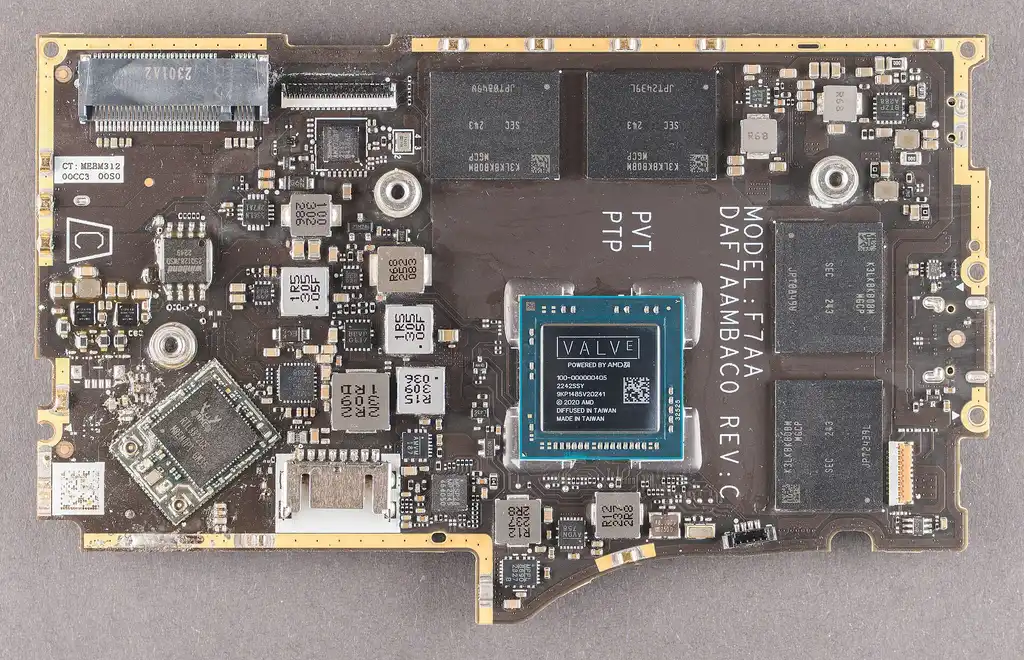
Photo: FritzchensFritz, Wikimedia Commons, CC0. The Deck's mainboard — the hardware every setting on this page ultimately serves.
The Only Sourced FPS Numbers
Everything quantitative on the internet about ReSkate on Deck traces back to community reports, so here they are with their sources attached, unexaggerated:
| Claim | Source | What it actually says |
|---|---|---|
| 60 FPS achievable | PCGuide, October 5, 2026 | Players running the game "perfectly fine on multiple maps" at 60 FPS on medium to low settings, online and offline |
| Multiplayer works on Deck | PCGuide, October 5, 2026 | "Even multiplayer works," per one quoted user |
| Custom maps playable | PCGuide, October 2026 | Skate 3 and Skate 2 map ports playable in multiplayer, plus commands like noclip and freecam |
| Two custom maps in one session | ReSkate issue #109, v2.0 window | A Deck player reports two custom maps loading in the same session under Proton — which failed before |
Read the table as what it is: a floor that community hardware achieved, not a promise for every Deck and every mod load. The honest tuning goal on Deck is the first row — hold 60 at medium-to-low in the base map, and spend your remaining budget on the maps you actually want.
Official source: ReSkate on GitHub — the launcher behaviors, launch option, and version history referenced throughout come from the project README and its release history. The community side of the story is documented at skatemods and its Steam Deck FAQ.
Launcher-Side Settings That Matter on Deck
The launcher is where Deck-specific tuning actually exists, and the v2.0 window made it handheld-friendly:
- Controller navigation. Since the v2.0 window the launcher works with a controller, with the Deck trackpad acting as a mouse (issue #63) — focus starts on PLAY and every panel is reachable from the pad. Before this, mod management on a Deck meant juggling a mouse; now it does not.
- The Steam launch option. The README now documents a launch option for Linux that swaps EA's anti-cheat launcher for ReSkate's, so ReSkate starts from skate.'s own Steam entry (issue #100) — no more non-Steam-shortcut juggling, and your Deck library shows one clean entry. This is the single biggest quality-of-life change for Deck players in the 2.0 window.
- Crash reporting. Settings → Advanced, or
RESKATE_CRASH_REPORTING=0. On Deck, where background I/O competes with the game, turning off the crash-report upload path is a defensible micro-optimization — and since v2.0 the platform blocks the game's own calls to ea.com inside the process anyway, with only EA's image CDN left reachable for fast-travel artwork. - Key remapping. The menu key (Insert) and console key (~) are rebindable in launcher Settings. On a handheld with no Insert key, this is not optional — remap both to something the Deck's pad or back-grip buttons can reach. The controls guide lists the defaults.
- Logs.
logs\ReSkate.logbeside the launcher. When a session misbehaves, this file plus your version is what a useful bug report contains.
The launcher self-updates on every run, and the 2.0 window shipped real Deck changes (controller support, the Steam launch option, the 2.0.1 Proton fix) within days. Launching the launcher is the update path — and its Settings page is where you notice what changed.
Proton Hygiene: The Setting That Breaks Everything When Stale
One version fact on this page outranks every other setting. ReSkate v2.0.0 would not start under Proton at all — the launcher reported "ReSkate could not attach to Skate" because Wine was missing one of the name-lookup functions the new version hooks. The fix landed in v2.0.1 within half an hour. The lesson generalizes: on Deck, a ReSkate that refuses to attach is almost always a version or Proton-layer problem, not a broken install.
The working checklist, in order:
- Update ReSkate — run the launcher and let it self-update first, before touching anything else.
- Force a recent Proton on whatever entry you launch (the Deck setup guide covers the Properties → Compatibility path).
- Launch from within Steam, signed in — launching the bare executable outside a Steam session is the classic route to "Unknown Player" with no multiplayer.
- If joining servers fails after hosting works, or vice versa, check the known-issues state rather than reinstalling: hosting a lobby under Proton has an open issue (#19), while joining was fixed long ago (#28).
In-Game Settings: What Persists and What Costs
Inside the game, two facts shape Deck expectations:
- Settings persist since v1.0.4 — graphics and control changes stick across sessions, so a one-time tuning session on the Deck is time well spent, not a nightly ritual.
- The physics body cap is 65,000 since v1.1.0 (raised from 8,200). You will never build 65,000 physics objects on a Deck, but the number explains map weight: full-city ports exist precisely because the engine can now hold that much content, and a Deck is where that content's cost shows up first.
The gameplay settings themselves are the base game's own — ReSkate does not add a graphics panel. What it adds is content, which is why the heaviest real "setting" on a Deck is the next section.
Map Weight: The Performance Setting You Actually Control
On a handheld, the difference between an 18 MB park and a 992 MB full city is the biggest performance lever that exists — bigger than anything in a settings menu:
| Content | Weight | Deck expectation |
|---|---|---|
| Base map (San Vansterdam) | Ships with the game | The 60 FPS tier from the community reports |
| Small parks (e.g., Black Box Distribution Park) | ~18 MB | Comfortable; a safe first custom map |
| Mid-size ports (e.g., Southbank) | ~129 MB | Fine in most reports; lights and night scenes cost more |
| Full Skate 3 Map | 690 MB | The heavy end — where issue #31's loading hangs historically lived |
| Skate2Map | 992 MB | The heaviest popular mod; treat as experimental on Deck |
The custom-map loading-hang issue (#31, open since v1.0.8) is the one big Deck performance story — and its state moved in the v2.0 window, with a player reporting two custom maps in one session under Proton (#109). Check the issue's current state before a long session with big maps, and remember the map weight table with sources lives in the maps guide.
The old community workaround for map hangs was staying on v1.0.7 — but the multiplayer protocol moved four times since (versions 43 through 46), and old builds cannot join sessions on new ones. A Deck that cannot join its friends' servers has traded away the game's best feature to load one map. Update, then pick lighter maps.
What Not to Bother With on Deck
Three tuning rabbit holes that do not apply, so you can skip them: the dual-GPU discrete-render fix (v1.0.6) targets laptops with two GPUs — a Deck has exactly one GPU; the VRAM streaming fix (v1.0.2) targeted RX 580-class desktop cards and is long since in every build you can install anyway; and anticheat-related workarounds are unnecessary by design, because ReSkate runs the pinned build without EA's anti-cheat — that absence is the entire reason the game runs on Deck at all while official skate. does not.
FAQ
What FPS does ReSkate get on Steam Deck? The only sourced figure is a community report: 60 FPS on medium to low settings across multiple maps, online and offline (PCGuide, October 5, 2026). There is no official benchmark; results vary with map weight and mod load, so treat 60 at medium-to-low as the community-achieved floor.
Which settings should I change first? Four, in order: remap the Insert and console keys in launcher Settings to pad-reachable buttons; enable the Steam launch option so ReSkate starts from skate.'s own entry; turn crash reporting off if you prefer (Settings → Advanced); and pick a small custom map before a full city. The in-game settings persist on their own since v1.0.4.
Why won't ReSkate start under Proton after updating? v2.0.0 shipped a Proton incompatibility ("ReSkate could not attach to Skate") that v2.0.1 fixed within half an hour — so the answer is almost always "update the launcher again." Self-update runs every time you open it; a stale Proton version on a non-Steam shortcut is the second suspect.
Do mods and custom maps work on Deck? Yes, with weight-based caveats: the base map and small parks are well-attested, custom maps in multiplayer were reported working (PCGuide), the loading-hang issue #31 saw improvement reports in the v2.0 window (#109), and lobby hosting under Proton remains the known rough edge (#19). Joining servers works.
Does tuning ReSkate risk my Deck or my EA account? Neither. ReSkate runs offline without EA servers, keeps saves local, and since v2.0 blocks the game's ea.com calls inside the process; crash-report uploads are optional and contain no credentials. The full risk picture, honestly sourced, is in the safety and ban guide — and Deck performance tuning touches none of it.
Related
More ReSkate Guides
Best ReSkate mods: Full Skate 3 Map, Skate 2 map, Skater XL ports, built-in Trainer, and top cosmetic and music picks, with versions.
Every ReSkate update from v1.0.0 to v1.1.3: per-version changes, pinned game build record, and how the launcher self-updates.
How characters work in ReSkate: your own skater, locally saved outfits and unlocks, Unknown Player when Steam is offline, and costume mods.
Official ReSkate Discord, GitHub, Thunderstore and Reddit links in one place: community hubs for new players, as of v1.1.3.
ReSkate keys and console commands cheat sheet: Insert menu, T chat, ~ console help; key changes follow the version stamp.
ReSkate not launching or crashing? Use this error lookup table to fix Unknown Player, antivirus blocks, old mods and build changes fast.
What changes in ReSkate gameplay: pinned skate. physics, offline play, 32-player lobbies, throwdowns, world controls, park editor and plugin modes.
Where ReSkate official code, releases and issue tracker live, how to read each repository, and how to confirm a download is genuine before running it.