
Skate 3 save files across PS3, Xbox 360, RPCS3 and the PC port: where each one is stored, how to copy a save, and what a 100 percent save file does.
Skate 3 Save File: Where It Lives and How to Back It Up
The Skate 3 save file lives wherever you play the game, and nowhere else. On an Xbox 360 it sits on the console's storage device — hard drive, Memory Unit, or a configured USB flash drive. On a PS3 it sits in the system storage under a region-coded folder like BLUS30464. On PC, RPCS3 keeps it inside dev_hdd0/home/.../savedata, and the recomp port keeps it in %APPDATA%\skate3. None of these locations syncs to a server, so the only backup that exists is the one you copy yourself.
- Xbox 360: storage device picked in-game; copy it off with a Memory Unit or configured USB flash drive.
- PS3: Saved Data Utility (PS3) in the XMB; copy to a FAT32 USB stick in the standard
PS3/SAVEDATAlayout. - RPCS3:
<RPCS3 folder>/dev_hdd0/home/<user>/savedata; back up the game's savedata folder. - Recomp (PC):
%APPDATA%\skate3by default; asavesfolder next to the exe or aportable.txtmakes it fully portable.
Written by an independent fan wiki with no ties to EA; save handling as of recomp v2.0.2 (July 24, 2026) and the current RPCS3 layout. Skate 3 launched in May 2010 for PS3 and Xbox 360.
Every Platform's Save Location at a Glance
| Platform | Where the save file lives | How you copy it off | Watch out for |
|---|---|---|---|
| Xbox 360 | Console storage device (hard drive, Memory Unit, configured USB drive) | In-game storage menu, or the console's storage screen | Saves are written against the profile that created them |
| PS3 | System storage, listed in Saved Data Utility (PS3) | Triangle on the save → Copy to a FAT32 USB stick | Folders are region-coded (BLUS30464, BLES00760, BLJM60296) |
| RPCS3 (PC) | <RPCS3 folder>/dev_hdd0/home/<user>/savedata |
Copy the game's savedata folder anywhere | Save states are not game saves — back up savedata |
| Recomp (PC) | %APPDATA%\skate3 on Windows |
Copy the folder; or use saves / portable.txt next to the exe |
Portable folders must exist before first launch |
The pattern across all four: one local folder, one copy operation, zero cloud — Skate 3 predates automatic console save syncing, so a dead hard drive means a dead career unless you made the copy.
Xbox 360: Hard Drive, Memory Units, and USB Sticks
On an Xbox 360, the Skate 3 save file is written to whichever storage device the game is pointed at — you pick it in-game, and the game's storage devices menu is where you manage it. Nothing about the save lives on the disc or on Xbox Live; it is a plain file on a plain storage device.
Three kinds of device can hold it:
- The console hard drive. The default home for most players.
- The official Xbox 360 Memory Unit — the small white card pictured below. Microsoft's own support page still states the rule for it: you can store or move up to 512 MB of content using the Xbox 360 Memory Unit, on the original Xbox 360 console only. The laterSlim models dropped the memory unit slots, so on those machines the card is useless and a USB drive is the answer (that hardware detail is community-documented, matching Microsoft's "original console only" wording).
Official source: Xbox 360 storage — Xbox Support — "You can store and move content between consoles" with the hard drive, transfer cable, USB flash drive, and "XBOX 360 memory unit (original XBOX 360 console only)".
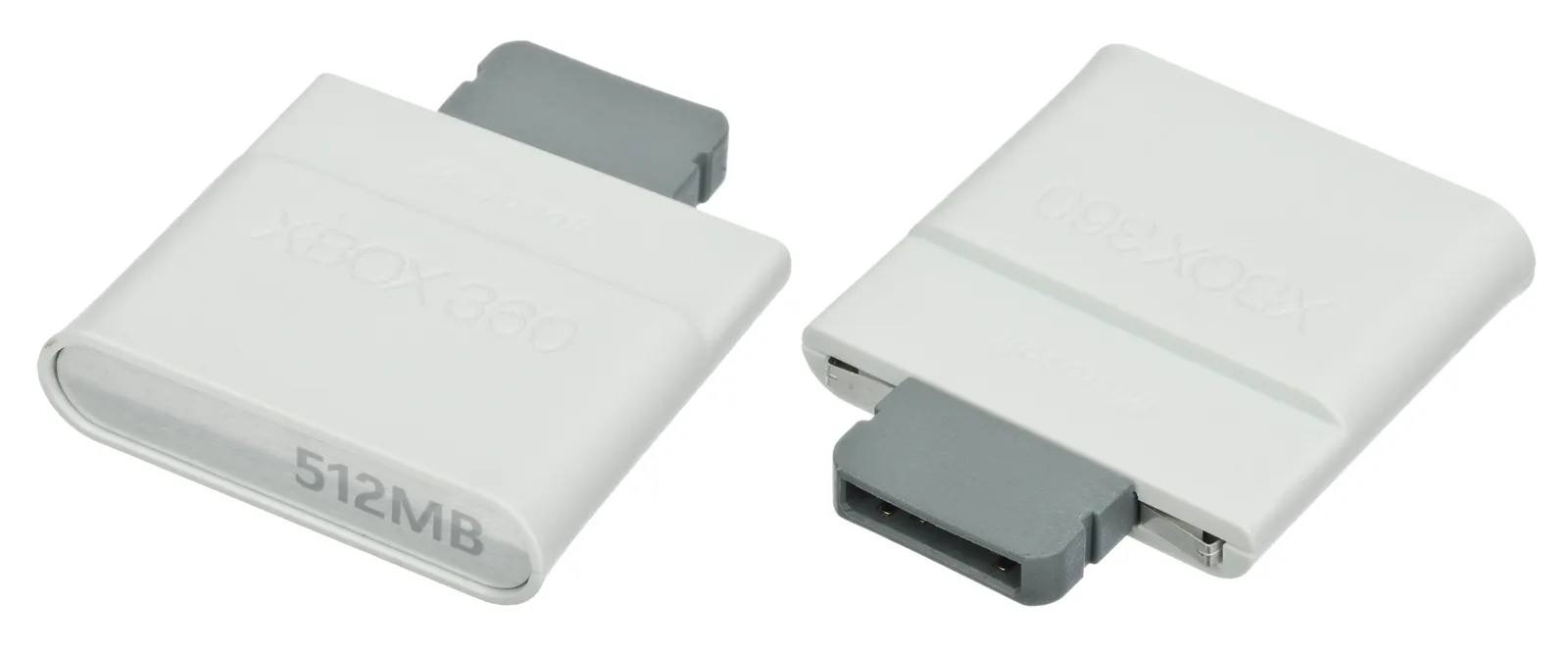
The official 512 MB Xbox 360 Memory Unit, front and back — the classic way to carry saves between consoles.
- A USB flash drive. Microsoft's Xbox 360 USB flash drive FAQ documents the feature: a USB drive can be configured in the console's storage settings and then used to store game saves, taking your saves or your gamertag to another console. The drive gets formatted for Xbox use, so pull it out in the storage menu before treating it as a normal flash stick on a PC.
Official source: XBOX 360 USB flash drive FAQ — Xbox Support — "A USB flash drive is a great way to take your game saves or gamertag with you to another console."
One honest caveat: Xbox 360 saves carry the signature of the profile that created them. A save downloaded from a gallery usually refuses to load until it is re-signed to your profile with third-party save tools — long-standing community practice, unofficial software you run at your own risk. Copying your own save between your own devices needs none of that.
PS3: Saved Data Utility and Region-Coded Folders
On a PS3, the Skate 3 save file sits in the console's system storage and shows up under the XMB's Saved Data Utility (PS3). The folder names are region-coded by the game's title ID — the same three releases this wiki documents for the emulator route: BLUS30464 (North America), BLES00760 (Europe), and BLJM60296 (Japan). A save made on a BLUS copy belongs to a BLUS copy; mixing regions is not a supported move.
Backing up one save takes a FAT32 USB stick and about fifteen seconds per file:
- Plug the USB stick into one of the PS3's front USB ports.
- Open Game → Saved Data Utility (PS3), scroll to the Skate 3 save.
- Press Triangle on it and choose Copy, then pick the USB device.
The console writes the standard USB layout — a PS3 folder with a SAVEDATA folder inside — which is what a PC sees on the stick and what a restore goes back into. For whole-console backups, Sony's manuals document two heavier tools: the Backup Utility (system storage to USB media) and the Data Transfer Utility (between two PS3 systems over Ethernet).
Official source: Backup Utility — PS3 manual — "Back up data saved in the system storage to storage media or a USB mass storage device, or restore data that has been backed up."
The companion doc, Data Transfer Utility — PS3 manual, covers moving a console's full data set to a replacement PS3 over Ethernet.
RPCS3 on PC: dev_hdd0 and the savedata Tree
RPCS3 emulates the PS3's storage layout rather than inventing its own, so a Skate 3 save inside the emulator is the same kind of savedata folder a real console writes. The emulator's own wiki states where it lives: your saves are located in \dev_hdd0\home\00000001\savedata inside your RPCS3 folder. The RPCS3 folder itself sits next to the program on Windows, in ~/.config/rpcs3/ on Linux, and in ~/Library/Application Support/rpcs3/ on macOS.
Official source: Help:Save State — RPCS3 Wiki — "Your saves are located in \dev_hdd0\home\00000001\savedata in your RPCS3 folder," with the Linux and macOS folder locations noted on the same page.
Three practical rules:
- Back up the savedata folder, not a save state. The wiki separates the two: a save state is an emulator snapshot; the game save is the real one. Copy the whole savedata folder.
- The
00000001user number can differ — it is the emulated PS3 user profile. Whichever numberedhomefolder containssavedatais yours. - Imports follow the same layout. A save from a real PS3 goes into
dev_hdd0/home/<user>/savedata— the RPCS3 project describes its storage exactly that way, savedata in the emulated drive'shome/USERID/savedata. Keep regions matched: a BLUS save needs the BLUS game version, same as on real hardware.
For the wider emulator-versus-port question, see the RPCS3 versus recomp comparison.
Recomp on PC: %APPDATA%\skate3 and Portable Saves
The recomp port documents its save handling in the project README, and it is the most flexible of the four routes because the project ships two portable options:
Official source: skate3recomp on GitHub — Saves and Portable Mode — "Saved games live in the user data folder by default (
%APPDATA%\skate3, i.e.AppData\Roaming\skate3, on Windows)."
- Default: saved games live in the user data folder —
%APPDATA%\skate3on Windows. - Portable saves folder: create a
savesfolder next toskate3.exeand the game keeps saved games there instead. The folder must exist before launch, and the README is blunt about the catch: existing saves are not migrated automatically — copy them over from the user data folder yourself. - Full portable mode: an empty
portable.txtfile next to the executable keeps all user data in the executable's folder, saves included. That is the setup for a game install living on an external drive. - macOS: the README keeps game files, saves, and settings together in the folder containing the app — which is why it tells you to extract the release somewhere you control instead of Downloads.
Two honesty notes. First, the README names only the Windows user data path; on Linux, check the folder beside the executable before trusting any hardcoded path quoted online. Second, whether the port loads a save imported from an actual Xbox 360 console is undocumented — don't plan a transfer around it. DLC lives in the separate dlc folder covered by the recomp mods guide; Deck specifics, including that same saves-folder trick, are in the Deck guide. How this port differs from the emulator and from ReSkate is on the recomp versus ReSkate page.
What a 100 Percent Save File Does
Skate 3's career has a literal finish line: sell one million boards by completing challenges, and the story ends there, with new clothing styles unlocked for your skater. A community "100 percent" save file is a career that has crossed that line — challenges and spots of Port Carverton finished, board sales goal reached — handed to you as a file so you start from the end.
What these saves actually contain, and what they don't:
- They carry progress, not content. A save holds your career state. Add-on parks and items arrive from the DLC packages themselves — installed on the console or dropped in the recomp's
dlcfolder. No save legitimately supplies content you never owned. - They are region- and platform-bound. A
BLUS/BLES/BLJMsave belongs to its PS3 region; a 360 save stays a 360 save; RPCS3 uses the PS3 format; the recomp has its own. None of them convert. - They come from strangers. Save galleries like GameFAQs and walkthrough videos on YouTube are where finished careers get shared — community-made, and on Xbox 360 still needing the profile-resigning step above.
Installing a downloaded save means replacing your own career file. Copy your existing save folder or storage-device contents somewhere safe first — the restore paths on this page work in reverse too, and a botched paste cannot be undone from inside the game.
There is also a legitimate in-between: a save editor that tweaks your own backed-up file instead of replacing it. What those tools can and cannot safely touch is covered in the save editor guide.
FAQ
Where is my Skate 3 save file on Xbox 360? On the console's storage device — hard drive, Memory Unit, or a USB drive configured in the console's storage settings. Find it through the game's storage devices menu, and copy it off with a Memory Unit (original consoles only) or the configured USB drive.
How do I copy my Skate 3 save to a USB stick?
On PS3: FAT32 stick in the front port, Game → Saved Data Utility (PS3), Triangle on the save, Copy. On Xbox 360: configure the drive for Xbox use in the console's storage settings first, then move the save onto it from the storage screen. On PC: copy %APPDATA%\skate3 (recomp) or the game's savedata folder inside dev_hdd0/home/ (RPCS3).
Can I use a Skate 3 save file I downloaded from the internet? On PS3 and RPCS3 it works when the region matches the game version you run. On Xbox 360 the save is signed to another profile, so it needs re-signing with unofficial save tools before a console will load it. Back up your own save before replacing anything.
Where does RPCS3 keep my Skate 3 saves?
In \dev_hdd0\home\00000001\savedata inside your RPCS3 folder — ~/.config/rpcs3/ on Linux, ~/Library/Application Support/rpcs3/ on macOS. Copy the whole savedata folder; a save state is not a substitute.
What does a 100 percent save file give me? A finished career: the challenge and spot progression of Port Carverton done and the one-million-board goal reached. It carries no DLC content, and it only works on the platform and region it was made for.
Related Guides
- Skate 3 Recomp vs ReSkate: Relationship Explained — which project touches which game, before you move files between them.
- Skate 3 RPCS3 vs Recomp: Two Ways to Play Skate 3 on PC — the emulator-versus-port decision that decides where your save lives on PC.
- Skate 3 Recomp Mods: What You Can Actually Install — the
dlcfolder rule that pairs with the portable-saves setup. - What ReSkate Is and How It Relates to EA skate. — if your save belongs to the new free skate. instead, that is a different game with different local folders.
More ReSkate Guides
Skate 3 recomp on Steam Deck: native Linux build vs Proton, install steps, the settings worth changing, and controller facts, as of v2.0.2.
What Skate 3 recomp can actually load: the DLC folder rule, community maps through the Level Loader, SK8-Engine, and the v2.0 renderer enhancements.
Skate 3 recomp has no online multiplayer: what the README says, the state of Skate 3 servers, and the four ways people actually skate together in 2026.
Skate 3 on RPCS3 vs the native recomp: PS3 emulator settings and patches, Xbox 360 port trade-offs, netplay, and which route to pick in 2026.
Install Skate 3 DLC on RPCS3: what the add-on packs contain, where the files go, how to confirm a pack loaded, and the corrupt or missing DLC fixes.
The Skate 3 RPCS3 settings that matter: the documented baseline, patch toggles, slow motion and controller fixes, and a Steam Deck starting point.
Skate 4 vs Skate 3 for PC players: what carried over, what the new game left out, and the mods that bring Skate 3 maps, realism and Hall of Meat back.
About re-skate.wiki: independent unofficial ReSkate fan site statement, sourcing and version policy, disclaimer, and contact notes.